


How to create invoices that look professional – and will get you paid quickly


Crunching numbers is often a challenge for even the best small business owners. Your time is already dedicated to client work, creative projects and bringing in business, and not everyone has the patience or expertise to master the financial side. But if you know how to make a professional invoice, you’re already a step ahead.
If you want to take control of your business’s finances, you must get on top of the invoicing process. Professional written communication is essential for establishing credibility. The process of creating and sending invoices is a direct reflection of how you work, so it pays to get it right. Fortunately, there are easy ways to maintain your cash flow, grow your business and manage your time without costly or complex invoicing systems.
Let’s clear up the essentials, shall we?
There are two ways to invoice a client – a template or an invoicing tool.
Templates are typically created in Word, Excel or Canva and can be free or paid, or one you’ve designed yourself.
While templates offer more design flexibility, you’ll need to manually edit information. To ensure the invoice is tax-compliant and professional, it’s important you take the time to dot the Is and cross the Ts. Invoice numbers must be unique and chronological for each invoice, so this has to be edited every time.
You can’t afford to overlook mistakes. This includes correctly calculating numbers and taxes, adjusting formatting, entering the invoice number and date, and ensuring the information is right before you download and email.
This process is time-consuming. Manually processing invoices and bills can take hours and hours each month. You have to do your due diligence to make sure your invoice is tax-compliant. And if you want it to look professional, you’ll need to polish up those design skills or find a template that reflects your brand, and update the colours and fonts to suit.
A tool or app automates your invoicing process and allows you to manage finances and clients in one place.
These invoicing tools prompt you to input important information. Because they handle compliance, design and store your details, you don’t have to waste time copying and pasting, and re-checking adjustments. They’re also useful for automatically calculating numbers and taxes, as well as generating invoice numbers.
Compared to templates, which rely on manual work, apps make it easier to manage cash flow, tax and separate finances. You can track who’s paid you, who hasn’t and offer clients multiple payment options.
While invoicing tools come with extra personalised features and automation, they often come with a fee too. Look for tiered plans and options to pay monthly or yearly.
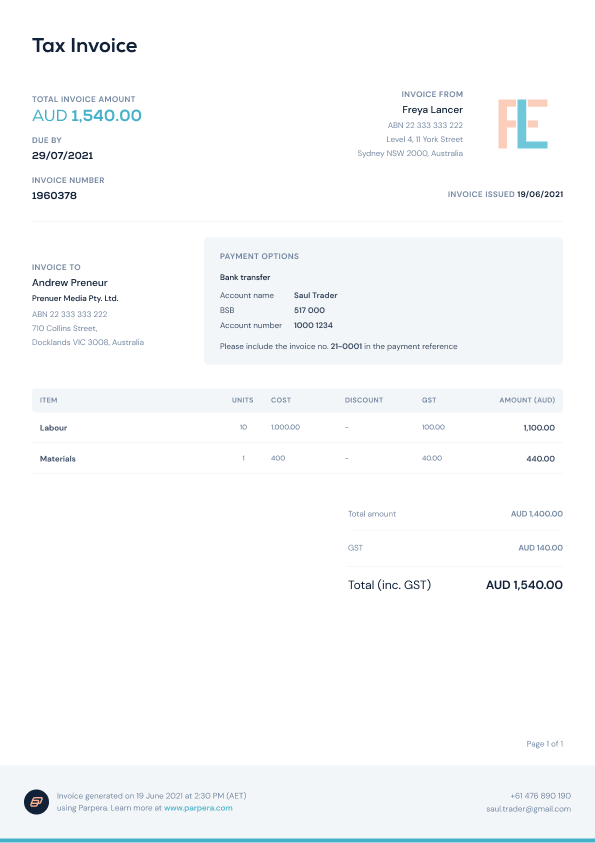
Along with the payment information, a professional invoice also provides details about tax and services/goods provided.
If you’re not required to register for GST, you’ll need to include your:
If you’re registered for GST, also include:
Here’s an example invoice generated in Parpera:
You certainly aren’t alone if you’re waiting for your last invoice to be paid. Everyone wants to be paid on time, even better if it’s earlier.
Yet 53 per cent of invoices are paid late. Service-based small businesses tend to struggle the most, but digital tools and automating cash flow can help you stop chasing up invoices and get paid sooner.
Avoid the payment headaches by:

No freelancer wants to waste time on admin, so using an invoicing app can actually save a lot of time. Michelle Thomas, who runs Backbeat Business Consulting, uses Parpera for her business.
“Parpera is where I manage invoicing and receipt of payments, and I am transitioning my expenses across to Parpera for those businesses that offer direct debit options to keep them isolated from my personal expenses,” Michelle tells Flying Solo. “Previously, I was using QuickBooks for invoicing, and my cash flow management was a combination of spreadsheets and traditional banking. All of this was time-intensive – especially at the end of the quarter.”
The Parpera invoicing app simplifies the process for faster, more efficient payments. All you need to do is add the invoice date, choose your pre-loaded services and add the price.
“It’s very quick and easy for invoice management,” she says. “I couldn’t count the number of hours saved in invoice management – not only does the app interface mean I can generate invoices on the bus trip home, but I also get a nice little notification to let me know when I’ve received payment.
“The greatest benefit, however, is having the bank account tightly integrated into the actual income and expense records means I can completely do away with the entire reconciliation step. And for a sole trader, less unpaid admin means more billable time and an actual weekend.”
Parpera offers freelancers:
Find out more about Parpera here.
Jayde Walker is a creative copywriter and small business owner in Perth.
This article is brought to you by Flying Solo in partnership with Parpera.
Feature image: Supplied.

Comments